

# Custom Handler Schema Reference This guide is for plugin developers who want to add FrontEdit support for a custom Gutenberg block. It documents the public schema contract used by custom handler plugins. Custom handlers are experimental. Build and test them on a staging site before using them on production content. ## Compatibility requirement FrontEdit saves edits by parsing and serializing the native Gutenberg block: ```js wp.blocks.parse( rawBlockContent ); wp.blocks.serialize( blocks ); ``` Before writing a handler for a non-core block, confirm that its provider has already registered the block on the editable frontend page. This registration must include the block's client-side attributes and its matching `save` implementation. ```js wp.blocks.getBlockType( 'your-namespace/your-block' ); ``` The command must return a block definition. If it returns `undefined`, do not add a FrontEdit handler yet. An editor-only provider script is not compatible with FrontEdit and must not be enqueued from a custom handler. Loading an editor-only bundle on the frontend can cause fatal errors, missing browser dependencies, or serialized content that loses provider settings. Core WordPress blocks are registered by FrontEdit. For a custom or third-party block, the block provider is responsible for the compatible frontend registration surface. ## Create a custom handler plugin Copy the `templates/frontedit-live-block-editor-custom-handlers` folder shipped with FrontEdit into `wp-content/plugins`, rename it, and activate it. Its bootstrap registers a PHP handler file through the `mwpsfe_external_handler_files` filter. Handler classes use the `MWPSFE` namespace and extend FrontEdit's public abstract handler classes. Give every PHP class a unique name. A handler ID that matches a built-in ID intentionally replaces that built-in registration. An edit handler normally extends `MWPSFE_Abstract_Text_Edit_Handler` and implements `MWPSFE_Schema_Handler_Interface`. Pair it with a comment handler only when you want the block to support FrontEdit comments. ## Minimal edit handler ```php class My_Plugin_Handler_Notice extends MWPSFE_Abstract_Text_Edit_Handler implements MWPSFE_Schema_Handler_Interface { public function id() { return 'my_plugin_notice'; } public function title() { return 'Edit Notice'; } public function element_type() { return 'Notice'; } public function element_type_code() { return 'my-plugin-notice'; } public function description() { return 'Edit this notice.'; } public function call_to_action() { return 'Click to edit this notice.'; } public function get_supported_blocks() { return array( 'my-plugin/notice' ); } public function get_schema_definition() { return array( 'version' => 1, 'block' => array( 'name' => 'my-plugin/notice', 'type' => 'text', ), 'components' => array( array( 'id' => 'content', 'label' => 'Content', 'type' => 'text', 'selector' => '.my-plugin-notice__content', 'default' => true, 'required' => true, 'placeholder' => 'Add content', 'bindings' => array( array( 'path' => 'content', 'source' => 'html' ), ), 'editor' => array( 'enterMode' => 'never', 'formats' => array( array( 'undo', 'redo' ), array( 'bold', 'italic' ) ), 'operations' => $this->normalize_editor_operations( array( $this->get_editor_text_rewrite_operation( 'content' ), $this->get_editor_inline_format_change_operation( 'content', array( 'bold', 'italic' ) ), ) ), ), ), ), ); } } ``` ## Schema shape Every schema has these required keys: ```php array( 'version' => 1, 'block' => array( 'name' => 'namespace/block', 'type' => 'text' ), 'components' => array(), ) ``` `block.type` is `text` or `media`. A schema may contain both text and file components when a block supports both kinds of editing. ### Optional pristine-default identity declaration Only use this declaration when a block is Gutenberg's native default writing surface and you know its exact untouched serialization: ```php 'identity' => array( 'pristineDefaultInnerHTML' => '

', ), ``` It tells FrontEdit to defer the *first* UUID assignment only while the block has no UUID or shadow UUID, no other block attributes or inner blocks, and its trimmed parsed `innerHTML` exactly matches the declared markup. This is not a general empty-content setting. Once an element has an identifier, FrontEdit will retain it—even if its content is later emptied—so existing history remains attached to that element. ### Components A component describes one editable part of the rendered block. | Key | Required | Description | | --- | --- | --- | | `id` | Yes | Unique component ID within the schema. | | `label` | Yes | Editor-facing label. | | `type` | Yes | `text` or `file`. | | `selector` | Yes | CSS selector relative to the rendered block root. Use `:scope` for the root. | | `default` | No | Selects the component opened by default. | | `required` | No | Blocks saving an empty text component. | | `placeholder` | No | Editor-only placeholder text. | | `bindings` | Text components | Maps the edited DOM value to block attributes. | | `editor` | No | Toolbar, operations, and keyboard behavior. | | `missingUI` | No | Describes an optional text node that may be absent from saved markup. | Text bindings use an attribute `path` and `source`. Use `source: 'html'` for rich text markup and `source: 'text'` for plain text. Attribute paths can be nested, for example `style.typography.textAlign`. ### Optional text components Use `missingUI` when a provider omits an optional text node until it has content. ```php 'missingUI' => array( 'mode' => 'ghost', 'mountSelector' => ':scope', 'placement' => 'append', // append or prepend 'tag' => 'p', 'attributes' => array( 'class' => 'my-plugin-notice__description' ), 'when' => array( 'path' => 'showDescription', 'equals' => true ), 'placementWhen' => array( 'path' => 'descriptionPosition', 'equals' => 'above', 'placement' => 'prepend', ), ), ``` `when` controls whether the ghost appears. `placementWhen` optionally changes its placement when an attribute matches. Both conditions use a scalar `equals` value. ### File components Use `type: 'file'` for a media replacement surface. In addition to the standard component keys, it requires a `target` object: ```php 'target' => array( 'selector' => ':self', // or a selector relative to the component root 'attribute' => 'src', 'mediaType' => 'image', ), ``` `mediaType` is one of `image`, `audio`, `video`, `file`, `image_or_video`, or `icon`. The target attribute is normally `src` or `href`. File and text components may be combined in one schema; FrontEdit switches at component scope but still serializes the complete block. ### Repeated components Use `repeat` for a component that occurs in a table, list, or another repeated structure. Grid mode declares `rowSelector` and `cellSelector`; FrontEdit then resolves `{row}` and `{column}` placeholders in binding paths. ```php 'repeat' => array( 'rowSelector' => 'tbody tr', 'cellSelector' => 'td', ), ``` Nested tree mode uses `mode: 'tree_path'`, `itemSelector`, and an optional `pathKey` (default `path`). Use it for one block that owns nested repeated text surfaces, such as a list. ### Binding sources Bindings require `path` and `source`. A path uses dot notation and may include repeat placeholders. Supported sources are: - `html` - rich inner HTML, including supported inline formatting. - `plaintext` - trimmed text without markup. - `textAlignment` - the active text alignment value. - `url` and `id` - media URL or attachment ID. - `media_type` - derives `image` or `video` from a pending media change. - `list_block` - rebuilds a complete nested list block from the live DOM. Media `url` bindings may set `resolved: true` to use WordPress-resolved attachment data. Set `value` to `width` or `height` when that resolved field is needed instead of the URL. ### Editor formats and operations `editor.formats` controls the toolbar. Supported tokens include `undo`, `redo`, `align`, `textAlignment`, `headingLevels`, `bold`, `italic`, `strikethrough`, `link`, `buttonLink`, `orderedList`, `unorderedList`, `indent`, and `outdent`. Nest tokens in an array to group them. `enterMode` may be `auto`, `always`, `never`, or `linebreak`. `linkUIMode: 'manual'` suppresses automatic link UI while a user edits an existing anchor; omit it for the default `auto` behavior. `tabMode` can use `none`, `indent`, `outdent`, `nextComponent`, or `previousComponent` for its `tab` and `shiftTab` values. `editor.options.preserveNewlines` converts `
` elements to literal newlines before saving. `newlinesToBR` does the opposite. Use only when the native block uses that representation. Use the protected helper methods on the abstract edit handler to declare the matching operations. Common helpers are: - `get_editor_text_rewrite_operation( $component_id )` - `get_editor_inline_format_change_operation( $component_id, $formats )` - `get_editor_inline_attribute_change_operation( $component_id, 'link', $capabilities )` - `get_editor_block_attribute_change_operation( $operation_id, $component_id, $capability )` Pass the completed array through `normalize_editor_operations()`. ### Attribute capabilities Declare block attributes used by toolbar operations under `editor.attributeCapabilities`. ```php 'headingLevels' => array( 'attribute' => 'level', 'values' => array( 1, 2, 3, 4, 5, 6 ), 'unsetValue' => 2, ), 'textAlignment' => array( 'attribute' => 'style.typography.textAlign', 'values' => array( 'left', 'center', 'right', 'justify' ), 'unsetValue' => 'left', ), ``` `headingLevels` is the canonical token for a heading-level or element-tag menu. For blocks whose values are tags, use values such as `h1`, `p`, and `div`, plus `tagChange: true`. The corresponding block-attribute operation will update both the declared attribute and the editable element tag. For a text-alignment capability, `preview: 'inline_style'` applies the preview through `style.textAlign` on the resolved format target. Use it only when the block's native frontend styling does not use WordPress `has-text-align-*` classes. `editor.formatTargets` can direct a toolbar operation to a selector or an object with `scope` (`component`, `block`, or `column`), `selector`, and an optional column `contextKey`. For example, use `array( 'align' => 'block' )` when block alignment belongs on the wrapper rather than the editable text node. ### Inline formatting For standard text formatting, obtain the supported format declarations with: ```php $inline_format_capabilities = $this->get_inline_format_capabilities( array( 'bold', 'italic', 'strikethrough', 'link' ) ); ``` Attach that value to `editor.inlineFormatCapabilities` and create matching inline-format and link operations. ## Validation checklist Before publishing a handler, verify all of the following on the frontend: 1. `wp.blocks.getBlockType( blockName )` returns the provider block definition. 2. Parsing then serializing an unchanged saved block preserves the block and its unrelated attributes. 3. Each text, media, attribute, and inline-format operation saves correctly. 4. Optional components materialize only under their declared conditions. 5. A provider update has not changed the saved markup, attributes, or `save` behavior your handler relies on. If any compatibility check fails, disable or defer the handler rather than editing rendered HTML directly. FrontEdit custom handlers always use Gutenberg's native block serialization path.

Idosa de 80 anos morre em ilha na Austrália após ser deixada para trás por cruzeiro

Uma passageira australiana de 80 anos morreu de forma trágica após ser deixada para trás em uma ilha remota durante um cruzeiro de luxo na Austrália. A vítima, identificada como Suzanne Rees, participava de uma viagem de 60 dias a bordo do navio Coral Adventurer, com passagens avaliadas em dezenas de milhares de dólares, quando desapareceu após uma excursão na Ilha Lizard, no extremo norte de Queensland.

O incidente ocorreu no sábado (25), durante a primeira parada do itinerário. Segundo autoridades e relatos da imprensa australiana, Rees desembarcou com um grupo de turistas para realizar uma trilha até o ponto mais alto da ilha, o Cook’s Look — um percurso considerado desafiador e recomendado apenas para pessoas com bom preparo físico. A idosa teria passado mal devido ao forte calor e se separado do grupo para descansar, sendo orientada a retornar por conta própria ao ponto de encontro.

Apesar disso, ela não foi acompanhada por nenhum membro da equipe. O navio deixou a ilha próximo ao pôr do sol, sem perceber a ausência da passageira. A falta de uma checagem de presença antes da partida se tornou um dos principais pontos de questionamento na investigação.

A tripulação só notou que Suzanne não havia retornado horas depois, durante o jantar. Apenas então foi iniciada uma operação de busca, que envolveu lanternas, equipes em terra e um helicóptero. As buscas foram suspensas de madrugada e retomadas no domingo (26), quando o corpo da idosa foi localizado na ilha. A polícia informou que se trata de uma morte “súbita e sem indícios de crime”, mas abriu um inquérito para apurar se houve negligência operacional.

Família acusa empresa de negligência

A filha da vítima, Katherine Rees, lamentou o ocorrido e criticou duramente a condução do caso pela companhia. Segundo ela, houve “falta de cuidado e bom senso” por parte da tripulação do Coral Adventurer.

“Era um dia muito quente, e minha mãe passou mal durante a subida. Disseram para ela voltar sozinha. O navio partiu aparentemente sem contar os passageiros. Em algum momento, ou logo depois, ela morreu, sozinha. Espero que a investigação revele o que a empresa poderia ter feito para salvar a vida dela,” afirmou Katherine ao jornal The Guardian.
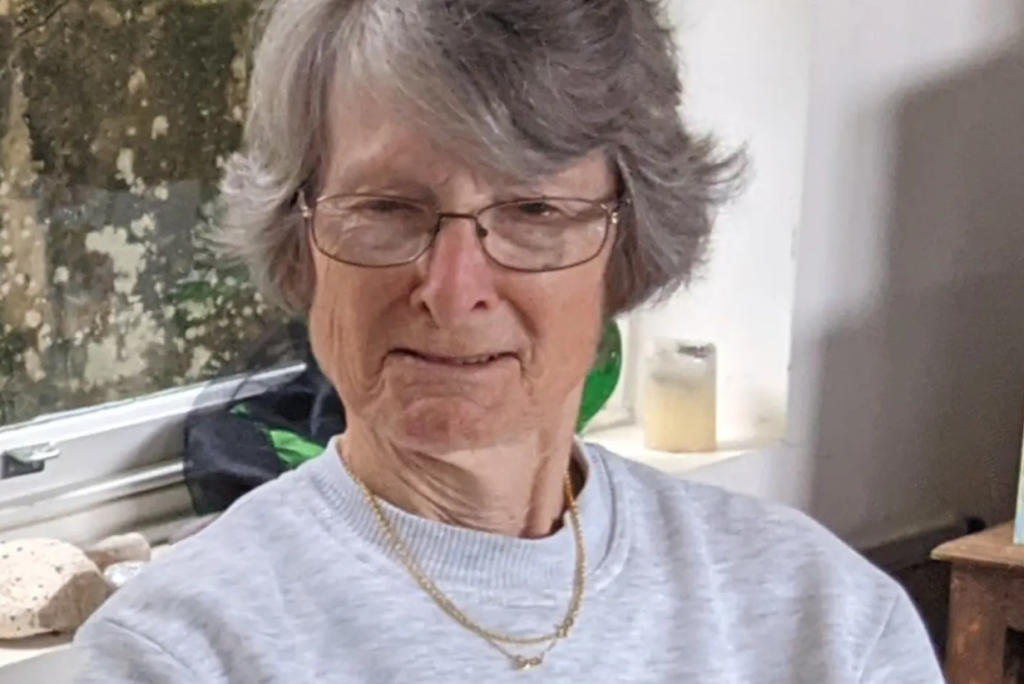
Captura de tela 2025 10 30 151352
Imagem/Reprodução/Fonte: The Sydney Morning Herald

Repercussão e investigação

O caso gerou grande repercussão no país, principalmente pelo fato de o Coral Adventurer transportar apenas cerca de 120 passageiros — número considerado relativamente pequeno para cruzeiros, o que costuma facilitar o controle de embarque e desembarque.

Especialistas do setor demonstraram estranhamento com a falha operacional. “Companhias de cruzeiro normalmente têm sistemas rígidos para confirmar quem está a bordo”, afirmou Adrian Tassone, consultor ouvido pela imprensa australiana. Ele destacou que, atualmente, navios usam cartões magnéticos ou sistemas eletrônicos para evitar exatamente esse tipo de erro.

A Autoridade Australiana de Segurança Marítima (AMSA) anunciou que irá se reunir com a tripulação e conduzir uma investigação formal. Um relatório será encaminhado ao médico legista.

Empresa lamenta tragédia

Em comunicado, Mark Fifield, diretor-executivo da Coral Expeditions, lamentou a morte da passageira e disse que a empresa está oferecendo apoio à família.

“Estamos profundamente consternados com o ocorrido e continuaremos colaborando com as investigações”, declarou.

A companhia, no entanto, afirmou que não pode comentar detalhes sobre o processo enquanto as apurações estiverem em andamento.

Após o incidente, o Coral Adventurer seguiu viagem em direção a Darwin, no Território do Norte.

Tristeza em cenário paradisíaco

Moradores e turistas próximos à região relataram a tensão das buscas durante a noite. Uma testemunha que estava navegando próximo à ilha afirmou ter visto helicópteros e equipes com lanternas tentando localizar a idosa. “Era para ter sido um momento feliz para aquela senhora. Foi muito triste ver isso acontecer em um lugar tão bonito”, disse.

Agora, a família de Suzanne Rees aguarda respostas — e o episódio reacende discussões sobre protocolos de segurança em excursões marítimas em áreas remotas.

Deixe um comentário

import React from 'react' import importPhoto from '../../api/importPhoto' import Button from './Button' import ButtonActionProvider from '../Actions/ButtonActionProvider' import ExternalLinkButton from './ExternalLinkButton' import useGlobalConfig from '../Contexts/useGlobalConfig' import { getImportedPhotoUrl } from '../../utils/linkGenerator' /** * Helper to render a series of buttons to install a template kit. * * @param photoId * @param photoTitle * @param showLabel * @param customActionHook * @param completeCallback * @param errorCallback * @returns {*} * @constructor */ const ImportPhotoButton = ({ photoId, photoTitle, showLabel = false, customActionHook = null, completeCallback = null, errorCallback = null }) => { const { getDownloadedItemId, addDownloadedItem } = useGlobalConfig() const importedPhotoId = getDownloadedItemId(photoId) let isAlreadyCompleted = !!importedPhotoId if (typeof window.envatoElements.photoImportCompleteCallback !== 'undefined') { // This variable is set in "main.jsx" and lets us reach into WordPress core code. // If this is set then we treat the download action as incomplete, this means we fire // importPhoto() again when in Deep Photo Integration mode. This allows our API to // return the JSON required for deep integration to work correctly. // The photo isn't imported twice due to a check in PHP so all good. isAlreadyCompleted = false } return ( } LoadingButton={