
# Custom Handler Schema Reference This guide is for plugin developers who want to add FrontEdit support for a custom Gutenberg block. It documents the public schema contract used by custom handler plugins. Custom handlers are experimental. Build and test them on a staging site before using them on production content. ## Compatibility requirement FrontEdit saves edits by parsing and serializing the native Gutenberg block: ```js wp.blocks.parse( rawBlockContent ); wp.blocks.serialize( blocks ); ``` Before writing a handler for a non-core block, confirm that its provider has already registered the block on the editable frontend page. This registration must include the block's client-side attributes and its matching `save` implementation. ```js wp.blocks.getBlockType( 'your-namespace/your-block' ); ``` The command must return a block definition. If it returns `undefined`, do not add a FrontEdit handler yet. An editor-only provider script is not compatible with FrontEdit and must not be enqueued from a custom handler. Loading an editor-only bundle on the frontend can cause fatal errors, missing browser dependencies, or serialized content that loses provider settings. Core WordPress blocks are registered by FrontEdit. For a custom or third-party block, the block provider is responsible for the compatible frontend registration surface. ## Create a custom handler plugin Copy the `templates/frontedit-live-block-editor-custom-handlers` folder shipped with FrontEdit into `wp-content/plugins`, rename it, and activate it. Its bootstrap registers a PHP handler file through the `mwpsfe_external_handler_files` filter. Handler classes use the `MWPSFE` namespace and extend FrontEdit's public abstract handler classes. Give every PHP class a unique name. A handler ID that matches a built-in ID intentionally replaces that built-in registration. An edit handler normally extends `MWPSFE_Abstract_Text_Edit_Handler` and implements `MWPSFE_Schema_Handler_Interface`. Pair it with a comment handler only when you want the block to support FrontEdit comments. ## Minimal edit handler ```php class My_Plugin_Handler_Notice extends MWPSFE_Abstract_Text_Edit_Handler implements MWPSFE_Schema_Handler_Interface { public function id() { return 'my_plugin_notice'; } public function title() { return 'Edit Notice'; } public function element_type() { return 'Notice'; } public function element_type_code() { return 'my-plugin-notice'; } public function description() { return 'Edit this notice.'; } public function call_to_action() { return 'Click to edit this notice.'; } public function get_supported_blocks() { return array( 'my-plugin/notice' ); } public function get_schema_definition() { return array( 'version' => 1, 'block' => array( 'name' => 'my-plugin/notice', 'type' => 'text', ), 'components' => array( array( 'id' => 'content', 'label' => 'Content', 'type' => 'text', 'selector' => '.my-plugin-notice__content', 'default' => true, 'required' => true, 'placeholder' => 'Add content', 'bindings' => array( array( 'path' => 'content', 'source' => 'html' ), ), 'editor' => array( 'enterMode' => 'never', 'formats' => array( array( 'undo', 'redo' ), array( 'bold', 'italic' ) ), 'operations' => $this->normalize_editor_operations( array( $this->get_editor_text_rewrite_operation( 'content' ), $this->get_editor_inline_format_change_operation( 'content', array( 'bold', 'italic' ) ), ) ), ), ), ), ); } } ``` ## Schema shape Every schema has these required keys: ```php array( 'version' => 1, 'block' => array( 'name' => 'namespace/block', 'type' => 'text' ), 'components' => array(), ) ``` `block.type` is `text` or `media`. A schema may contain both text and file components when a block supports both kinds of editing. ### Optional pristine-default identity declaration Only use this declaration when a block is Gutenberg's native default writing surface and you know its exact untouched serialization: ```php 'identity' => array( 'pristineDefaultInnerHTML' => '

', ), ``` It tells FrontEdit to defer the *first* UUID assignment only while the block has no UUID or shadow UUID, no other block attributes or inner blocks, and its trimmed parsed `innerHTML` exactly matches the declared markup. This is not a general empty-content setting. Once an element has an identifier, FrontEdit will retain it—even if its content is later emptied—so existing history remains attached to that element. ### Components A component describes one editable part of the rendered block. | Key | Required | Description | | --- | --- | --- | | `id` | Yes | Unique component ID within the schema. | | `label` | Yes | Editor-facing label. | | `type` | Yes | `text` or `file`. | | `selector` | Yes | CSS selector relative to the rendered block root. Use `:scope` for the root. | | `default` | No | Selects the component opened by default. | | `required` | No | Blocks saving an empty text component. | | `placeholder` | No | Editor-only placeholder text. | | `bindings` | Text components | Maps the edited DOM value to block attributes. | | `editor` | No | Toolbar, operations, and keyboard behavior. | | `missingUI` | No | Describes an optional text node that may be absent from saved markup. | Text bindings use an attribute `path` and `source`. Use `source: 'html'` for rich text markup and `source: 'text'` for plain text. Attribute paths can be nested, for example `style.typography.textAlign`. ### Optional text components Use `missingUI` when a provider omits an optional text node until it has content. ```php 'missingUI' => array( 'mode' => 'ghost', 'mountSelector' => ':scope', 'placement' => 'append', // append or prepend 'tag' => 'p', 'attributes' => array( 'class' => 'my-plugin-notice__description' ), 'when' => array( 'path' => 'showDescription', 'equals' => true ), 'placementWhen' => array( 'path' => 'descriptionPosition', 'equals' => 'above', 'placement' => 'prepend', ), ), ``` `when` controls whether the ghost appears. `placementWhen` optionally changes its placement when an attribute matches. Both conditions use a scalar `equals` value. ### File components Use `type: 'file'` for a media replacement surface. In addition to the standard component keys, it requires a `target` object: ```php 'target' => array( 'selector' => ':self', // or a selector relative to the component root 'attribute' => 'src', 'mediaType' => 'image', ), ``` `mediaType` is one of `image`, `audio`, `video`, `file`, `image_or_video`, or `icon`. The target attribute is normally `src` or `href`. File and text components may be combined in one schema; FrontEdit switches at component scope but still serializes the complete block. ### Repeated components Use `repeat` for a component that occurs in a table, list, or another repeated structure. Grid mode declares `rowSelector` and `cellSelector`; FrontEdit then resolves `{row}` and `{column}` placeholders in binding paths. ```php 'repeat' => array( 'rowSelector' => 'tbody tr', 'cellSelector' => 'td', ), ``` Nested tree mode uses `mode: 'tree_path'`, `itemSelector`, and an optional `pathKey` (default `path`). Use it for one block that owns nested repeated text surfaces, such as a list. ### Binding sources Bindings require `path` and `source`. A path uses dot notation and may include repeat placeholders. Supported sources are: - `html` - rich inner HTML, including supported inline formatting. - `plaintext` - trimmed text without markup. - `textAlignment` - the active text alignment value. - `url` and `id` - media URL or attachment ID. - `media_type` - derives `image` or `video` from a pending media change. - `list_block` - rebuilds a complete nested list block from the live DOM. Media `url` bindings may set `resolved: true` to use WordPress-resolved attachment data. Set `value` to `width` or `height` when that resolved field is needed instead of the URL. ### Editor formats and operations `editor.formats` controls the toolbar. Supported tokens include `undo`, `redo`, `align`, `textAlignment`, `headingLevels`, `bold`, `italic`, `strikethrough`, `link`, `buttonLink`, `orderedList`, `unorderedList`, `indent`, and `outdent`. Nest tokens in an array to group them. `enterMode` may be `auto`, `always`, `never`, or `linebreak`. `linkUIMode: 'manual'` suppresses automatic link UI while a user edits an existing anchor; omit it for the default `auto` behavior. `tabMode` can use `none`, `indent`, `outdent`, `nextComponent`, or `previousComponent` for its `tab` and `shiftTab` values. `editor.options.preserveNewlines` converts `
` elements to literal newlines before saving. `newlinesToBR` does the opposite. Use only when the native block uses that representation. Use the protected helper methods on the abstract edit handler to declare the matching operations. Common helpers are: - `get_editor_text_rewrite_operation( $component_id )` - `get_editor_inline_format_change_operation( $component_id, $formats )` - `get_editor_inline_attribute_change_operation( $component_id, 'link', $capabilities )` - `get_editor_block_attribute_change_operation( $operation_id, $component_id, $capability )` Pass the completed array through `normalize_editor_operations()`. ### Attribute capabilities Declare block attributes used by toolbar operations under `editor.attributeCapabilities`. ```php 'headingLevels' => array( 'attribute' => 'level', 'values' => array( 1, 2, 3, 4, 5, 6 ), 'unsetValue' => 2, ), 'textAlignment' => array( 'attribute' => 'style.typography.textAlign', 'values' => array( 'left', 'center', 'right', 'justify' ), 'unsetValue' => 'left', ), ``` `headingLevels` is the canonical token for a heading-level or element-tag menu. For blocks whose values are tags, use values such as `h1`, `p`, and `div`, plus `tagChange: true`. The corresponding block-attribute operation will update both the declared attribute and the editable element tag. For a text-alignment capability, `preview: 'inline_style'` applies the preview through `style.textAlign` on the resolved format target. Use it only when the block's native frontend styling does not use WordPress `has-text-align-*` classes. `editor.formatTargets` can direct a toolbar operation to a selector or an object with `scope` (`component`, `block`, or `column`), `selector`, and an optional column `contextKey`. For example, use `array( 'align' => 'block' )` when block alignment belongs on the wrapper rather than the editable text node. ### Inline formatting For standard text formatting, obtain the supported format declarations with: ```php $inline_format_capabilities = $this->get_inline_format_capabilities( array( 'bold', 'italic', 'strikethrough', 'link' ) ); ``` Attach that value to `editor.inlineFormatCapabilities` and create matching inline-format and link operations. ## Validation checklist Before publishing a handler, verify all of the following on the frontend: 1. `wp.blocks.getBlockType( blockName )` returns the provider block definition. 2. Parsing then serializing an unchanged saved block preserves the block and its unrelated attributes. 3. Each text, media, attribute, and inline-format operation saves correctly. 4. Optional components materialize only under their declared conditions. 5. A provider update has not changed the saved markup, attributes, or `save` behavior your handler relies on. If any compatibility check fails, disable or defer the handler rather than editing rendered HTML directly. FrontEdit custom handlers always use Gutenberg's native block serialization path.

Clima esquenta em “A Fazenda 17” com desentendimentos e advertência a peoa

O reality show “A Fazenda 17 entrou oficialmente em sua reta final, e o clima entre os participantes tem se tornado cada vez mais tenso. Estratégias, provocações e desconfianças marcam os últimos dias do confinamento, enquanto os peões buscam escapar da Roça e garantir presença na grande decisão.

Saory fala sobre “investimento” no apresentador

Durante uma conversa na área externa da sede, Saory Cardoso, Dudu Camargo e Carol Lekker protagonizaram um momento descontraído ao comentarem sobre a aparência do apresentador do reality.
Em tom de brincadeira, Saory afirmou que pretende “dar um jeito” nele quando deixar o programa: “Eu peguei ele na planta! Agora vou deixar ele bonitinho demais.”
A conversa seguiu com Carol elogiando os olhos da própria colega, dizendo que “uma mulher com esses olhos ganha muita coisa na vida”. Dudu concordou, destacando que a ex-Miss Bumbum sempre o enaltece desde o início da temporada.

Relação entre Dudu Camargo e Saory se desgasta

A dinâmica gravada no domingo (30) expôs o momento mais delicado da relação entre Dudu e Saory. A peoa questionou o apresentador sobre como deveria chamá-lo a partir da situação: “Você prefere que te chame de amigo ou de ex? Brother ou ex?”

O rompimento se intensificou após Tamires Assis revelar que Dudu teria exposto detalhes íntimos sobre uma peça de roupa de Saory encontrada suja no banheiro.
Segundo Tamires, Dudu teria dito a ela que a calcinha era de Saory e insinuado que a situação não estaria relacionada a problemas de saúde. A dentista reagiu de forma breve, apenas afirmando estar “chocada”.

Para Dudu, Tamires estaria tentando prejudicá-lo por ciúmes, alegando que ela se incomodou quando ele deixou de priorizá-la no convívio diário. Apesar de tentar resolver a situação na casa da árvore, Saory evitou o diálogo. Carol Lekker chegou a aconselhá-la: “Tem que enquadrar ele, botar contra a parede.”

Relembre a polêmica

O episódio envolvendo a peça íntima ocorreu em outubro e gerou grande repercussão entre os peões. A calcinha, encontrada no banheiro, foi descrita por alguns como estando “suja”, o que causou críticas e chacotas.
Martina Sanzi chegou a comentar: “Coisa de gente relaxada.” Maria Caporusso afirmou ter vontade de “explanar” o caso.

Dudu contou a Tamires que a peça seria de Saory e que o boato já se espalhava pela sede. Ele relatou que Matheus foi quem encontrou a calcinha e mostrou para Wallas, que repassou a informação para outros peões.
A situação se estendeu até a cozinha, onde Carol Lekker, Kathy Maravilha e outros participantes discutiram o assunto e ironizaram a cor da peça.

Reality entra no modo reta final

O episódio desta segunda-feira (1º) marcou a transição oficial de “A Fazenda 17” para sua reta final. O clima descontraído deu lugar a movimentos calculados, olhares cautelosos e estratégias milimetricamente pensadas.
Com o confinamento mais curto e menos espaços de manobra, cada palavra e gesto passaram a ter peso na formação da Roça e na permanência dos peões.

Carol Lekker vence a Prova de Fogo

A Prova de Fogo colocou Carol, Fabiano Moraes e Luiz Mesquita em um desafio sensorial no Gigante de Feno. Vendados e guiados apenas pelo tato e por sinos, eles precisaram identificar suas raias geométricas e acertar ferraduras no alvo.

Apesar das confusões e distrações que arrancaram risadas de Adriane Galisteu, Carol dominou a prova e garantiu o Lampião, tornando-se o centro das atenções na sede. A festa de comemoração envolveu Duda e Fabiano, que montaram uma brincadeira para anunciar a vitória. Como consequência, Fabiano enviou Mesquita para a Baia, e Duda puxou Toninho Tornado.
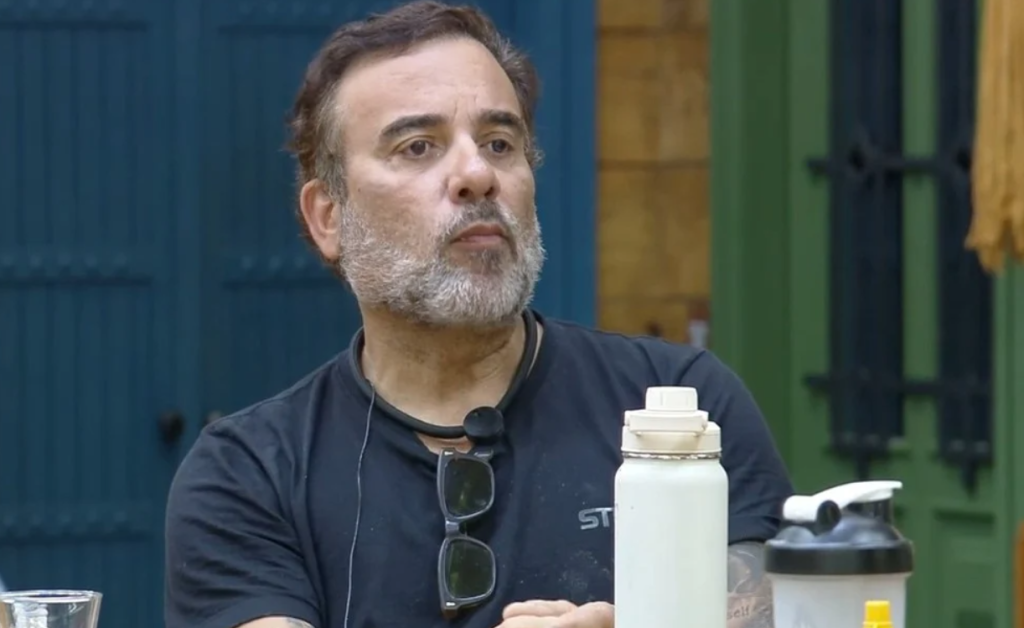
Captura de tela 2025 12 02 094240
Fabiano – Foto: Reprodução/Record Plus

Galisteu dá bronca ao vivo em Saory

Antes da Prova de Fogo, Adriane Galisteu surpreendeu os peões ao trazer um comunicado sério. A apresentadora explicou que Saory havia se recusado a participar de uma festa por não gostar da roupa enviada pela produção — atitude que gerou uma advertência registrada no monitor.

Galisteu foi firme: “A recusa ao participar das atividades pode gerar expulsão após duas advertências.”

Ela reforçou que essa regra faz parte do contrato assinado por todos. Se houver nova recusa da dentista, a peoa poderá ser expulsa, especialmente em um momento crítico do jogo, que agora conta com apenas 10 participantes.

saory pode ser
Saory pode ser explusa – Foto: Reprodução/Record Plus

Dudu volta a escapar da Roça e irrita outros participantes

Toninho, Walério e Tamires discutiram a possibilidade de Dudu finalmente enfrentar a Roça. Para eles, o apresentador estaria “fugindo mais uma vez”, o que causou desconforto no grupo.

Na Baia, Toninho e Fabiano garantiram as melhores camas antes de Mesquita e Duda, separando o casal e dando início a mais uma sequência de tensões.

Deixe um comentário

import React from 'react' import importPhoto from '../../api/importPhoto' import Button from './Button' import ButtonActionProvider from '../Actions/ButtonActionProvider' import ExternalLinkButton from './ExternalLinkButton' import useGlobalConfig from '../Contexts/useGlobalConfig' import { getImportedPhotoUrl } from '../../utils/linkGenerator' /** * Helper to render a series of buttons to install a template kit. * * @param photoId * @param photoTitle * @param showLabel * @param customActionHook * @param completeCallback * @param errorCallback * @returns {*} * @constructor */ const ImportPhotoButton = ({ photoId, photoTitle, showLabel = false, customActionHook = null, completeCallback = null, errorCallback = null }) => { const { getDownloadedItemId, addDownloadedItem } = useGlobalConfig() const importedPhotoId = getDownloadedItemId(photoId) let isAlreadyCompleted = !!importedPhotoId if (typeof window.envatoElements.photoImportCompleteCallback !== 'undefined') { // This variable is set in "main.jsx" and lets us reach into WordPress core code. // If this is set then we treat the download action as incomplete, this means we fire // importPhoto() again when in Deep Photo Integration mode. This allows our API to // return the JSON required for deep integration to work correctly. // The photo isn't imported twice due to a check in PHP so all good. isAlreadyCompleted = false } return ( } LoadingButton={